

Starting an online business today has never been easy. Now you can create your own online store from anywhere in the world where people can shop from your store and get anything they want. Now that is called E-commerce(electronic commerce), the buying and selling of goods and services over an electronic network, primarily the internet. Online shopping has quickly become one of the most important methods of expanding a business.
Bluehost lets you create an online store with the help of its e-commerce tools and plugins. Bluehost has partnered with WooCommerce(the most popular e-commerce platform built for WordPress). With Bluehost and WooCommerce you can build the exact online store that you want and need. If you are planning to start up your own business to sell your own products that you’ve made yourself, or you’re interested in expanding your local business into the online space, this guide on how to start an online store will help you get WooCommerce set up so you can start selling.
Why You Should Choose WooCommerce
WooCommerce is completely free to use and is powered by a community of developers dedicated to making WooCommerce as flexible and versatile as the industry needs. As the internet and online stores continue to evolve, WooCommerce evolves with it. Bluehost makes building a WooCommerce website easy for beginners while still providing all the tools necessary for pros. WooCommerce allows anyone to set up and run a professional online store in minutes. The best part is that it’s all powered by WordPress so your data is all 100% owned by you.
Step by Step How To Open An Online Store
A. Find a host
B. Learn how to set up WordPress
C. Learn how to set up WooCommerce
D. Choose a website theme
E. Add products to your online WooCommerce store
F. Create an effective sales funnel
G. Use extensions to improve your website
Find A Host
Simply choose the hosting plan that is right for your website needs, and then create or add your existing domain. Bluehost is one of the best-known WordPress hosts on the web. They offer an easy step-by-step set up with WordPress, a free domain name for the first year, and 24/7 customer support.
Learn How To Set Up WordPress.
After choosing a host that is suitable for your business. It’s time to set up WordPress as your website-building platform.
Bluehost offers automatic WordPress installation. You just need to log into your Bluehost account and choose to log into WordPress under the My Sites tab. Then, click Create Site to start building.
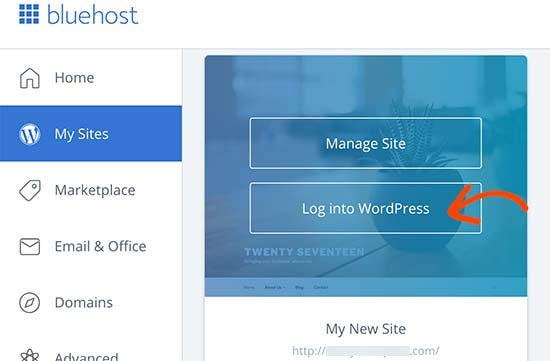
If you are using a different website host, you may need to install WordPress manually. There are various website hosts and they separately have a different setup so, get in touch with your host’s customer service to find out more about installing WordPress.
The incredible with Bluehost is that you can migrate your WordPress from your current host to Bluehost.
Learn How To Set Up WooCommerce.
Now you’ll need to set up WooCommerce. Start by installing the WooCommerce plugin which will enable you to start posting products and accepting customer payments.
Below is a quick guide to WooCommerce setup using Bluehost.
- Open your WordPress dashboard.
- Select the Plugins tab.
- You’ll see the WordPress Plugin Directory. Find WooCommerce and select it.
- WooCommerce will install. When it’s finished installing, click Activate.
- You’ll then see WooCommerce in your active plugins list. Congratulations! You’ve got WooCommerce set up.
After you’ve installed and activated WooCommerce, you’ll have access to all of the plugin’s functions. You can now:
- Build website pages
- List products
- Set up payment methods
Choose A Website Theme.
A theme or template is so important to choose when building your online store. Customizing your theme gives visitors an idea of what your brand is about. This is the first thing visitors will notice. A good customized color scheme will attract more visitors.
Customizing a theme that appropriately fits with your brand is simple using WooCommerce. The default WooCommerce theme is called Storefront, and you can install it for free in the WordPress Theme Directory.
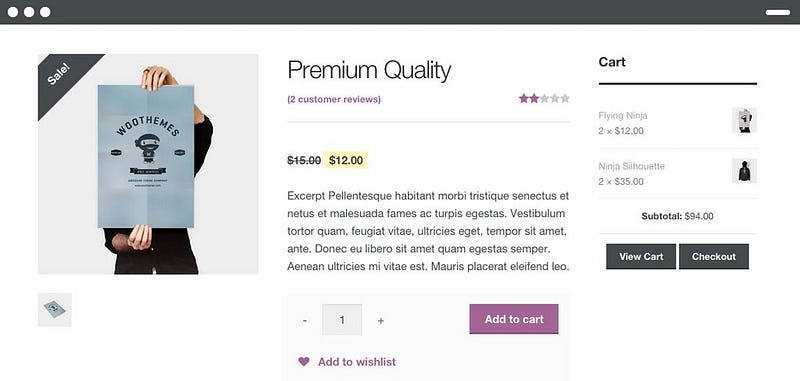
A default Storefront is a great option for most businesses. It fits with about every type of brand. If you want a different outlook you can purchase premium WooCommerce themes or hire an external designer. Bluehost also offers a premium theme marketplace for our users.
Add Products To Your Online WooCommerce Store.
You can start building the actual pages that will make up your website.
Landing page: This is very important on your online store. This is where the visitors will land first when they come to your store through an organic Google search.
It can be used to
- Encourage new visitors to learn more about your store
- Optimize for relevant keywords
- Highlight your best products
Product Listing and Product Pages: These pages are for displaying and listing your products.
WooCommerce provides easy product page templates where you can customize features such as:
- Price
- Product photo
- Product description
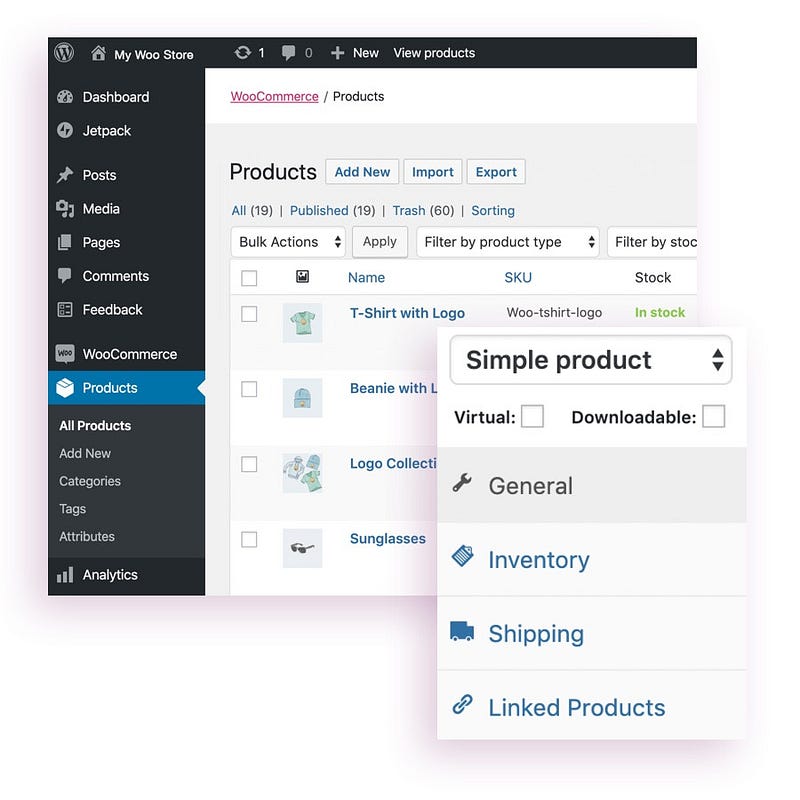
In the Products Dashboard, you can add all your products. This dashboard lets you:
- Filter by product category and customizable tags
- Enter inventory and shipping information
- Link certain products together
Managing your products here in the product's dashboard is quick and easy. Whenever you have a new product, you can quickly add it to your list, and it will instantly appear on your website.
If you want to make changes to a specific product, you won’t have to make complicated changes to a webpage — simply edit the settings in your dashboard.
Shopping cart and Checkout
You’ll also be able to create a high-quality shopping cart and checkout pages with WooCommerce.
In the Payments extension dashboard, you can quickly access information about purchases and returns and update factors such as shipping costs.
Create An Effective Sales Funnel.
When you start an online store, you should focus on building a business plan that prioritizes using an effective sales funnel. This way, you’ll be able to guide users through your website from the homepage to checkout.
- Use SEO (search engine optimization) keyword research and social media marketing to reach your target audience and improve your incoming organic traffic.
- Use opt-ins to generate an email list of leads.
- Implement automated email marketing to contact potential customers at key points in the buyer journey.
- Follow up with customers to encourage brand loyalty.
Use Extensions To Improve Your Websites.
WooCommerce comes with a range of extension options that can help you to further customize your online store.
Here are just a few examples of great WooCommerce extensions you can try.
- Increase your available payment methods. The Payments extension makes it easy to offer a range of payment gateways at checkout, including credit card payments, PayPal, and Stripe.
- Increase average order value by creating product kits. With the Composite Products extension, you’ll be able to create customizable product sets to encourage your customers to spend a little more each time they visit your website.
- Let customers make bookings and appointments. With the WooCommerce Bookings extension, you can let customers book appointments or make reservations.
Congratulations! Now you have your own Online Store with Bluehost.
That’s it! I hope everything was simple and clear.
If you have any questions, Feel free to comment below.






0 Comments